Cloud vs. On-Prem Access Control: Which Is Better for Multi-Site Businesses?
Share this article:
30 sec. overview
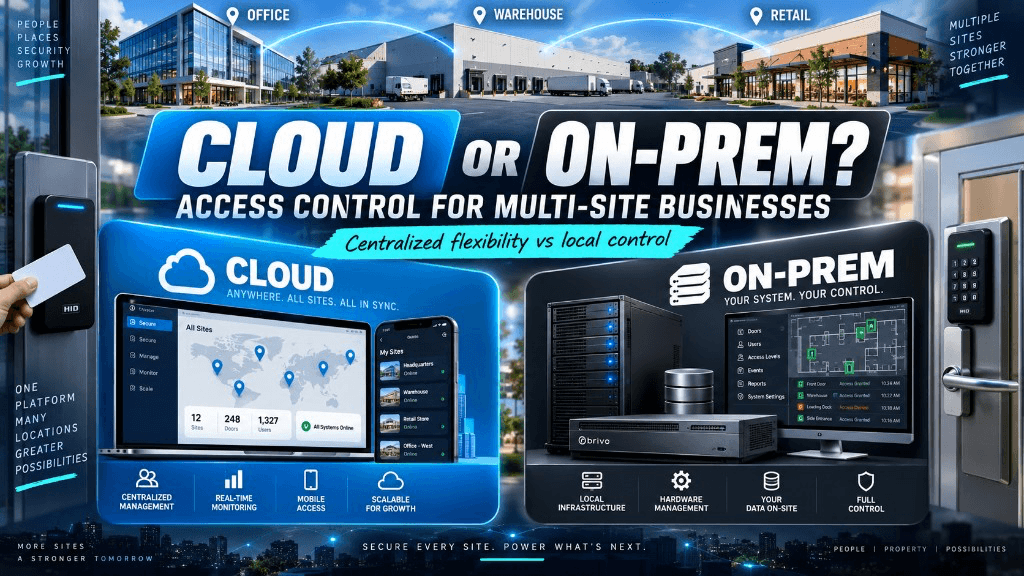
For multi-site buyers: choose cloud-managed access control for one dashboard and faster credential changes; choose on-prem when data residency, weak internet, or local-server policy wins; choose hybrid when flagship sites need local resilience and satellites need lighter admin. Score site count, connectivity, credential velocity, audit workflow, and identity standards—not brand slogans.
If you run doors across warehouses in the Inland Empire, offices in Orange County, a plant in San Diego County, or school sites across Los Angeles County, the access question is rarely "which lock brand?" It is how credentials, schedules, and audits stay consistent when your teams and contractors move between buildings every week.
Short answer for multi-site buyers:
- Choose cloud-managed access control when you need one dashboard across sites, faster credential changes for traveling managers and vendors, and less reliance on a local server at every address.
- Choose on-premises access control when you must keep door databases and event logs inside your network, internet at some sites is weak or tightly controlled, or IT policy requires local servers you already operate.
- Choose a hybrid model when flagship sites need local resilience and satellite sites need lighter, cloud-friendly administration.
Neither architecture is automatically "better." The right access control installation for a multi-site SoCal footprint depends on site count, network quality, who administers badges day to day, and how fast you need to revoke access after a turnover or contractor closeout.
This guide is a decision framework—not a door-by-door install checklist and not a cost-per-door worksheet. Use it to align IT, facilities, operations, and security before you scope hardware. When you are ready to phase doors without freezing operations, use the door-by-door access control checklist. Pair architecture choice with common access control mistakes so the model you pick does not get undone by daily process failures. If you are still deciding repair vs replace vs modernize first, see the commercial security system upgrade checklist.
What Multi-Site Access Control Really Means in Southern California
Multi-site access control is the system that decides who can enter which door, when, and with what proof—across more than one building. For Southern California operators, that often includes:
- Distribution and logistics docks from Ontario to Carson
- Light manufacturing and plant floors with shift changes
- Multi-building office campuses in LA and OC
- School and campus clusters with visitor and after-hours rules
The hard part is not adding a reader. It is keeping policy, people, and proof in sync when HR onboards in one city and a warehouse supervisor needs the badge working the same afternoon in another.
A solid commercial access control installation plans for that reality: controllers, readers, credentials, network paths, and the admin model your team will actually use on busy Mondays—not only the day the panel is powered up. Mobile credentials and role-based admin often matter as much as the lock hardware when managers travel the 10/60/91 corridors.
How On-Prem Access Control Works Across Multiple Sites
On-premises (on-prem) access control keeps the primary database, door schedules, and often the event history on servers or appliances you host—usually in a data closet, IDF/MDF, or a central IT environment you control.
At each site you still have door hardware, readers, and controllers. The difference is where the "source of truth" lives and how sites talk to it.
Typical On-Prem Pattern for Multi-Site
- Local controllers at each building handle door decisions if the WAN drops
- A central server (or per-site servers) holds cardholder records and audit data
- Admins connect over VPN, RDP, or a thick client to make changes
- Backups, patches, and server health are your responsibility (or your MSP's)
Where On-Prem Fits Multi-Site Well
- Strict data-residency or air-gapped expectations
- Sites with unreliable or restricted internet where local autonomy matters
- IT teams already staffed to run servers, backups, and identity integrations on-prem
- Environments that already standardize on a platform your security team knows deeply
Where On-Prem Creates Friction at Scale
- Credential changes can lag if every admin path depends on VPN and local software
- Version drift between sites if panels and software are not kept in lockstep
- New site cutovers need careful replication and network planning
- Remote facilities managers may struggle to "just open a door schedule" from a phone between LA and SD traffic
On-prem is not outdated. It is a control and ownership model. Many multi-site operators keep it for good reasons—especially when paired with disciplined structured cabling and network segmentation so door traffic stays predictable.
How Cloud-Managed Access Control Works Across Multiple Sites
Cloud-managed access control still uses readers, locks, and controllers on site. What moves to the cloud is typically management, user directories, schedules, mobile credentials, and centralized reporting. Controllers usually cache rules so doors keep working if the internet blips—similar in spirit to how cloud cameras vs traditional DVR/NVR trade management location without removing field hardware.
What Multi-Site Teams Usually Notice First
- One browser or app login for LA, OC, IE, and SD sites
- Faster badge issuance and revocation for contractors and seasonal staff
- Role-based admin so a warehouse lead can manage doors at their site without full enterprise rights
- Health and offline alerts that surface before a Monday morning lockout becomes an ops ticket storm
Where Cloud Shines for Multi-Site SoCal Businesses
- Growing footprints—new lease in Rancho Cucamonga or a second office in Irvine
- Distributed admins (facilities + HR + security) who are not all on the same VPN
- Need for consistent visitor and after-hours workflows across similar building types
- Preference to reduce per-site server babysitting
Tradeoffs to Plan for Honestly
- Ongoing software/subscription line items alongside hardware
- Internet design and failover still matter for management and some features
- Some organizations prefer (or require) cardholder data and logs fully on-prem
- Change management: cloud speed helps only if your badge process and approvals keep up
Cloud is not "set and forget." It is a centralized operations model that still depends on clean field installation, power, cabling, and clear ownership of who can change access rights. Platforms such as Verkada access control, Brivo, and Rhombus access control still need the same door readiness and admin hygiene. For the cybersecurity side of cloud or on-prem panels, see cybersecurity for physical security systems.
Decision Criteria: Cloud vs On-Prem for Multi-Site ACS
Use these criteria in IT / facilities / security reviews. Score each site group—not every single door.
1) Site Count and Admin Distance
- Few sites, one IT team on campus: on-prem can stay simple.
- Many sites, managers who travel the 10/60/91 corridors: cloud often reduces "who has the software license key?" delays.
2) Connectivity Reality
- Strong, managed WAN with failover: either model can work; design for controller cache either way.
- Weak or policy-restricted internet: lean on-prem or hybrid with strong local autonomy.
3) Credential Velocity
Ask: how often do you add, move, or revoke people and vendors?
- High churn (3PL warehouses, contractors, schools): cloud or tightly integrated hybrid usually wins on time-to-revoke.
- Stable populations with rare changes: on-prem admin overhead may be acceptable.
4) Audit and Investigation Workflow
Security and ops need who opened what, when—fast.
- Cloud dashboards often make cross-site search easier for multi-building reviews.
- On-prem can meet the same need if reporting, retention, and remote access are deliberately designed—not left as afterthoughts.
5) Identity and IT Standards
- Heavy Microsoft / Azure AD / Okta preference and cloud-first IT: cloud ACS often aligns.
- Strict on-prem directory and no SaaS for physical security: on-prem or controlled hybrid.
6) Growth and Standardization
If you expect new docks, classrooms, or office suites in the next 12–24 months, ask which model makes repeatable site templates easier. Standardization beats one-off cleverness when you operate across LA, OC, IE, and SD.
Hybrid Access Control: When "Both" Is the Honest Answer
Many multi-site businesses land on hybrid without calling it that:
- Critical manufacturing or campus core stays on-prem for local control and policy
- Satellite offices or smaller warehouses use cloud-managed doors for lighter admin
- Or: cloud management with on-site controllers that continue offline with cached permissions
Hybrid works when you define one source of truth for people and clear rules for which doors sync where. It fails when every site invents its own badge process.
For complex footprints, pair access decisions with the broader security system installation picture—cameras, intrusion, and door events should support the same investigation story, not three disconnected tools. That is the core idea behind smart security integration. For how visibility changes when sites multiply, see single-site vs multi-site security.
Industry Notes: Warehouses, Manufacturing, Schools, and Offices
Logistics and Warehouses
Dock doors, trailer yards, and temp labor mean fast credential cycles. Multi-site logistics operators often favor cloud or hybrid for consistency across IE and coastal facilities—while still requiring local door survival during ISP outages. For related site design context, see warehouse security cameras in the Inland Empire and how to secure a large warehouse.
Manufacturing
Shift patterns, contractor trades, and production-area zoning push toward clear role models. Plants may keep on-prem for OT-adjacent policies while offices share a cloud directory. Align door schedules with production calendars, not only HR hire dates.
Schools and Campus Clusters
Visitor management, after-hours athletics, and multi-building campuses reward central policy with local exceptions. Whether cloud or on-prem, the win is consistent lockdown/schedule language across sites—not a different process at every campus.
Multi-Site Offices
Shared suites and traveling executives care about mobile credentials and remote unlock workflows—with audit trails facilities can defend. Cloud often reduces friction; on-prem remains valid where corporate IT forbids cloud physical security.
What a Strong Multi-Site Access Control Installation Should Include
Stay at the architecture layer—this is not a hardware pick list:
- Controller strategy: local decision-making when WAN fails
- Credential model: cards, fobs, mobile, PIN—standardized naming and revocation
- Network path: VLANs, PoE planning, and structured pathways between IDF and doors
- Admin roles: who can edit schedules vs who can only view audits
- Site templates: repeatable door types (main entry, warehouse man-door, server room)
- Cutover plan: how old badges retire without locking out first shift
- Integration boundaries: HR/identity, visitor, video—only where they reduce real work
Operators expanding near the Inland Empire corridor often evaluate site readiness alongside local service coverage; see EPW's Ontario location page for area context when planning IE warehouses and offices. Gate and yard doors may also need vehicle gate access planned in the same architecture conversation.
Common Mistakes Multi-Site Buyers Make
- Buying for one flagship site and assuming the same admin model works for every lease.
- Ignoring offline behavior until an ISP outage strands a dock crew.
- Too many admins with full rights—or one overworked person with the only login.
- Mixing credential types without a retirement plan for legacy cards.
- Treating access as a standalone silo from cameras and alarms, then struggling during incidents.
- Skipping network and cabling readiness, which turns a clean ACS design into change-order friction later.
Avoiding these mistakes matters more than arguing brand slogans. The architecture choice should make daily operations boring—in a good way.
How to Choose in One Working Session
Bring IT, facilities, ops, and security. Answer these in writing:
- How many sites in 12 months—and who will administer each?
- What happens to doors if internet is down for four hours?
- How fast must we revoke a contractor across all sites?
- Where must cardholder and event data live?
- What identity system is non-negotiable?
- Which sites need identical templates vs unique exceptions?
If answers cluster around speed, distributed admins, and growth, cloud or hybrid usually leads. If answers cluster around data locality, constrained networks, and existing server ops, on-prem stays competitive. Then scope the access control installation against that decision—not the other way around.
FAQs
Is cloud access control safe enough for commercial multi-site use?
Commercial cloud ACS platforms are widely used, but "safe enough" depends on your identity controls, admin hygiene, network design, and offline door behavior. Evaluate encryption, role-based access, and your own MFA/admin practices—not marketing claims alone.
Will doors still work if the internet goes down?
Most modern cloud and many on-prem designs keep local controllers that continue enforcing cached permissions during outages. Confirm that behavior for your exact platform and door types during design review.
Can we mix cloud and on-prem across our SoCal sites?
Yes—many organizations run hybrid portfolios. Success depends on a clear people directory strategy and consistent credential lifecycle, not on forcing every building onto one slogan.
Do we need new cabling for either approach?
Often yes for clean PoE, reader runs, and network segmentation—especially in older warehouses and retrofit offices. Cabling readiness should be assessed early, whether you choose cloud or on-prem management. Plan that work through structured cabling before panel and reader counts get locked.
Which is better for warehouses vs offices?
Warehouses with high contractor churn often benefit from cloud-speed admin; offices may follow corporate IT standards either way. Site function matters less than admin distance, churn, and connectivity.
How does this relate to cameras and alarms?
Access events are more useful when video and intrusion tell the same story. Plan ACS alongside your broader security stack—including commercial camera systems—so investigations are not a scavenger hunt across tools.
Should schools prioritize cloud or on-prem?
Schools should prioritize policy consistency, lockdown procedures, and who can change schedules—then pick the architecture that supports those rules under their IT and data policies.
What should we ask vendors before we buy?
Ask about offline behavior, multi-site admin roles, identity integration options, reporting retention, site template repeatability, and how cutovers avoid locking out first shift. Require answers in writing for your site count—not a generic brochure.
Next Step: Facility Security Modernization Review
If you manage doors across Los Angeles, Orange County, the Inland Empire, or San Diego County, End-Point Wireless can help you map cloud vs on-prem vs hybrid to your real sites, networks, and admin workflows—before you standardize the wrong model.
Request a Facility Security Modernization Review or call 1-800-276-0415. Start the conversation on our contact page and bring your site list, current access control platform (if any), and who owns badge changes today. Related: access control installation · mobile credentials · door-by-door ACS checklist · multi-site security visibility.
Choosing cloud, on-prem, or hybrid doors?
Ask about a Facility Security Modernization Review, or get a quote for multi-site access control installation across Southern California