Cat6, Cat6A or Fiber? A Commercial Cabling Decision Guide for IT and Facilities Teams
Share this article:
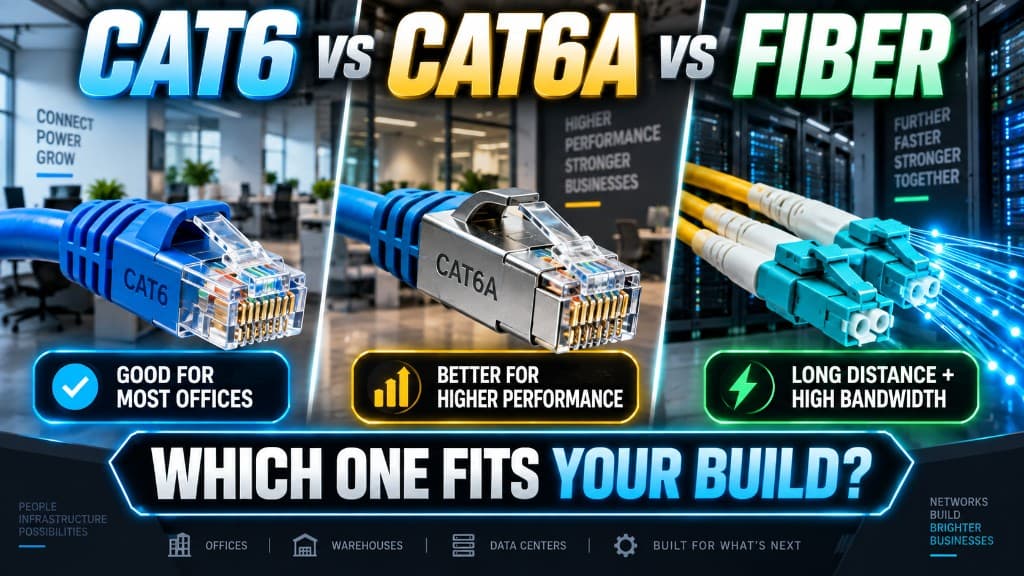
If you are planning cameras, Wi-Fi 6/7 APs, access doors, or a warehouse floor refresh across Southern California, the cabling question is not "which cable is fastest on a datasheet." It is which media keeps bandwidth, PoE, and distance honest between your MDF, IDFs, and every endpoint you will add in the next three to five years.
30 sec. overview
- Choose Cat6 when most drops are standard desks, phones, and modest PoE devices inside typical horizontal runs—and you are not pushing multi-gig Wi-Fi or dense high-power cameras on the same plant.
- Choose Cat6A when you need headroom for multi-gig access points, heavier PoE budgets, and longer-lived camera/Wi-Fi density—especially in warehouses, plants, and multi-story campuses where ripping cable again is painful.
- Choose fiber for backbones between buildings or distant IDFs, high-bandwidth aggregation, EMI-heavy paths, and any run where copper distance or noise becomes the limiting factor.
Treat the decision as a facility design choice, not a weekend DIY upgrade. A commercial structured cabling plan ties media, pathways, labeling, and test results to how IT and facilities actually operate the site.
This guide is a media-selection framework for IT and facilities teams working with a structured cabling contractor. It is not a home networking how-to, not a closeout paperwork checklist, and not a deep fiber commissioning tutorial. Use it to align stakeholders before you lock pathway drawings and material lists.
Why Media Choice Belongs to IT and Facilities Together
Copper vs. fiber decisions land between two owners:
- IT cares about link speed, switch port capability, VLAN design, PoE budgets, and whether tomorrow's APs and NVRs will starve on yesterday's plant.
- Facilities cares about pathways, plenum vs. riser, ceiling access, firestopping, IDF real estate, and whether a retrofit will shut down a dock or production line.
When those teams decide separately, sites end up with orphan Cat5e in one wing, Cat6 in another, and no documented backbone—then a camera or Wi-Fi project becomes a surprise recable. Southern California campuses—from Inland Empire distribution floors to OC office towers and LA multi-building sites—see this pattern often after tenant churn or piecemeal security adds.
A single commercial plan answers three questions up front:
- What bandwidth do horizontal drops and backbones need for the devices you already know about?
- What PoE class and density will cameras, APs, readers, and phones demand at the same time?
- What distance and pathway reality exists between MDF, IDFs, and endpoints—including future cameras, Wi-Fi, and access points?
For how network patterns support multi-site visibility, see single-site vs multi-site security and centralized visibility.
Cat6 in Commercial Buildings: Where It Still Fits
Category 6 (Cat6) remains a workhorse for many commercial horizontal runs. In practice, IT and facilities teams still specify Cat6 when:
- Most outlets serve workstations, VoIP phones, and printers
- Camera and AP counts are moderate, and switch ports are mostly 1 Gbps
- Horizontal lengths stay comfortably inside standards-based copper limits with clean pathways
- The site is not planning a near-term jump to dense multi-gig wireless or high-PoE camera grids
Strengths of Cat6 for commercial use:
- Familiar installation and termination practices for most crews
- Adequate performance for a large share of desk and basic IoT drops
- Lower material cost than Cat6A in many bids (without inventing specific prices here—compare apples-to-apples in your RFP)
Limits you should not ignore:
- Less headroom for multi-gig AP uplinks and future wireless density
- Tighter practical margins on alien crosstalk and heat in dense PoE bundles compared with Cat6A designs aimed at those loads
- A "good enough today" plant can become the bottleneck when facilities adds a camera-heavy security system installation or a full Wi-Fi refresh two years later
Cat6 is not "wrong." It is a fit-for-purpose choice when the device roadmap and PoE plan stay within its strengths—and when your structured cabling contractor documents that assumption clearly so the next project does not inherit silent risk.
Cat6A: The Default Upgrade Path for Many SoCal Facilities
Category 6A (Cat6A) is often the better commercial default when the building must support cameras, modern Wi-Fi, and access control on the same structured plant for years—not just desks.
IT and facilities teams lean Cat6A when:
- Access points need 2.5G / 5G (or planned multi-gig) copper links
- Camera counts are rising—dock doors, yard poles, interior high bays, retail floors
- PoE budgets are climbing (PTZ cameras, multi-radio APs, door controllers with accessories)
- Horizontal design needs margin so a future AP swap does not force a recable
Why Cat6A shows up in warehouses and plants: In logistics and manufacturing environments across the Inland Empire and broader SoCal corridor, ceiling heights, metal structures, and long walks from IDF to endpoint make "pull once, live with it" the real strategy. Cat6A's extra performance and design headroom align with that reality when Wi-Fi coverage and camera coverage expand together.
Practical Cat6A planning notes:
- Confirm pathway fill, bend radius, and bundle management—Cat6A cable is typically larger; pathways must match the media, not the other way around
- Align switch PoE budget and cooling with the densest IDF, not the average closet
- Label and test to the same commercial standard you would for any enterprise plant—media choice without verification is still guesswork
If your five-year roadmap includes more cameras, denser wireless, and more powered edge devices, Cat6A on the horizontal is frequently the media that keeps IT and facilities out of a second major pull. Pair closet and switch work with network setup and configuration.
Fiber: Backbone, Distance, and Noise—Not Every Drop
Fiber optic cabling is rarely the right answer for every desk jack. It is often the right answer between MDFs and IDFs, between buildings, and across distance or EMI constraints copper cannot serve cleanly.
Choose fiber when:
- You need building-to-building or long campus links beyond practical copper horizontal limits
- Aggregating many 1G/2.5G/10G copper edges into a high-capacity backbone
- Pathways run near heavy electrical gear, elevators, or industrial noise sources where copper is a poor bet
- You want clear separation of backbone vs. horizontal roles in a multi-IDF design
What fiber does not automatically replace:
- Most PoE endpoints still need copper (or hybrid approaches) at the last segment unless you redesign power delivery
- Every AP and camera still needs a power story—fiber alone does not feed PoE
- Patching, media converters, and optics skill still matter; fiber is a systems choice, not a magic cable swap
For multi-building SoCal campuses—think office plus warehouse, or a plant with a separate admin building—fiber between MDFs/IDFs plus copper (often Cat6A) to the edge is a common, durable pattern when planned as one system. Closet buildouts belong in that conversation—see MDF/IDF buildout.
Decision Framework: Bandwidth, PoE, Distance, MDF/IDF, Future Loads
Use this checklist in joint IT / facilities reviews before you approve materials.
1) Bandwidth at the Edge vs. the Backbone
- Desks and phones: Cat6 often sufficient
- Wi-Fi 6/6E/7 APs and multi-gig plans: bias toward Cat6A
- IDF-to-MDF aggregation and inter-building: bias toward fiber
Ask vendors and your structured cabling contractor for a device-by-device speed map, not a single "Cat6 everywhere" line item.
2) PoE Budgets and Thermal Reality
Cameras, APs, and access control installation hardware often share the same closets and cable bundles. Plan for:
- Concurrent PoE draw at peak (not nameplate "average")
- Switch power supplies and UPS sizing in each IDF
- Bundle heat and pathway airflow—especially in packed Inland Empire warehouse IDFs near Ontario
Media that "supports PoE on paper" still fails if the closet cannot deliver power safely and consistently.
3) Distance and Pathway Truth
Walk the routes—or require as-built pathway drawings—before you lock copper vs. fiber:
- Horizontal copper has length and pathway quality limits; optimistic "it should reach" estimates create dead drops
- Vertical risers and exterior pathways change firestopping, jacket type, and protection needs
- Temporary construction paths are not permanent commercial pathways
4) MDF / IDF Topology
A clean commercial design usually includes:
- MDF as the core network and often security head-end location
- IDFs sized for switch, UPS, and cable density—not leftover broom closets
- Documented backbone media (commonly fiber) between them
- Horizontal media chosen for the endpoint mix hanging off each IDF
If you are adding cameras and Wi-Fi without revisiting IDF power and cooling, media choice alone will not save the project.
5) Future Cameras, Wi-Fi, and Access
Assume growth unless the lease or use case says otherwise:
- Extra camera coverage on docks, yards, and lobbies
- Higher AP density for scanners, tablets, and guest traffic
- More doors and readers as operations expand
Design the plant so a Facility Security Modernization wave can land on tested pathways—not on an emergency recable. Use the commercial security system upgrade checklist when cameras and access share that same plant.
Common Media Mistakes Commercial Teams Make
Avoid these patterns when scoping with a structured cabling contractor:
- Mixing categories without a map — undocumented Cat5e/Cat6/Cat6A mixes create support chaos
- Copper backbones "because we have leftovers" — distance and noise problems show up later as intermittent outages
- Ignoring PoE when buying cable — cameras and APs are power projects as much as data projects
- Skipping test results and labeling — moves/adds/changes become expensive guesswork (for fiber, see OTDR testing and the fiber closeout package)
- Treating security cabling as an afterthought — readers, locks, and cameras deserve the same pathway discipline as data drops
- DIY or piecemeal pulls in a live commercial site — code, firestopping, and production impact are not optional in LA, OC, IE, or SD facilities
Commercial cabling is a building system. Choose media the way you choose HVAC capacity: for the load you will actually run. Seam gaps between cable, cameras, and access also show up in one low voltage contractor vs five vendors.
How a Structured Cabling Contractor Should Frame the Recommendation
A competent commercial partner should walk IT and facilities through:
- Endpoint inventory — desks, APs, cameras, access, printers, specialty gear
- Speed and PoE matrix — per device class, not marketing slogans
- MDF/IDF and pathway survey — real lengths, fill, and access constraints
- Media recommendation by role — horizontal vs. backbone vs. inter-building
- Growth allowance — spare pathways, spare ports, and documented assumptions
- Verification plan — labeling, testing, and as-builts your teams can use next year
If a bid only lists "Cat6 drops" with no backbone story and no PoE discussion, you do not yet have a decision guide—you have a materials guess. Normalize those assumptions with how to compare low voltage contractor bids.
SoCal Context: Same Standards, Different Buildings
Southern California commercial sites share standards but not floor plates. An Ontario logistics dock, an Orange County multi-tenant office, a San Diego County light-industrial bay, and a Los Angeles campus building may all need Cat6A horizontals and fiber between closets—or they may not. The difference is device density, distance, and how hard a recable would be.
Local pathway access, landlord rules, and after-hours work windows matter as much as category letters. Bring facilities early so media choice matches how the building can actually be opened for pulls.
FAQ
Is Cat6 obsolete for commercial buildings?
No. Cat6 remains appropriate for many desk and light IoT horizontals when bandwidth and PoE plans fit. It becomes the wrong default when multi-gig Wi-Fi, dense cameras, and rising PoE loads are already on the roadmap.
When should we standardize on Cat6A instead of Cat6?
Standardize on Cat6A when access points, cameras, and other powered devices need multi-gig headroom or heavier PoE, and when you want one horizontal media story for several years of growth—especially in warehouses, plants, and multi-IDF campuses.
Do we still need copper if we install fiber?
Yes for most PoE endpoints. Fiber commonly serves backbones and long or noisy runs; copper (often Cat6A) still delivers data and power to APs, cameras, and many access devices at the edge.
How do MDF and IDF design affect Cat6 vs Cat6A vs fiber?
Closet placement sets distance. Too few IDFs push copper runs toward their limits and force awkward pathways. Good MDF/IDF spacing makes Cat6A horizontals practical and keeps fiber where it belongs—on the backbone.
Can we mix Cat6 and Cat6A in one building?
You can, if the mix is intentional and documented—for example Cat6A for AP/camera zones and Cat6 for standard offices. Undocumented mixes create troubleshooting and upgrade risk. Prefer a clear zone strategy over random leftovers.
Should IT or facilities own the media decision?
Both. IT owns performance and PoE requirements; facilities owns pathways, access, and building impact. A structured cabling contractor should facilitate a joint decision, not sell cable in isolation.
How does this relate to cameras and access control projects?
Security and access projects ride the same plant. Plan media and IDF power when you plan cameras and doors so a later security expansion does not discover that half the ceilings cannot support another pull. Watch for the pathway exclusions called out in camera quote red flags that turn into change orders.
Next Step: Align Media Before You Bid Materials
Cat6, Cat6A, and fiber are not competing slogans. They are roles in a commercial network: horizontal copper matched to edge devices, fiber matched to distance and backbone load, and closets sized for the PoE and heat that follow.
If your IT and facilities teams need a clear recommendation before the next camera, Wi-Fi, or access rollout, request a Facility Security Modernization Review. Endpoint Wireless helps Southern California operators map bandwidth, PoE, distance, and MDF/IDF reality into a practical cabling plan—not a DIY experiment.
Call 1-800-276-0415 or contact Endpoint Wireless to schedule your Facility Security Modernization Review. More guidance lives on the Endpoint Wireless blog.
Choosing Cat6, Cat6A, or fiber?
Ask about a Facility Security Modernization Review, or get a quote for commercial structured cabling across Southern California