Single-Mode vs. Multimode Fiber: What Commercial Buyers Actually Need to Know
Share this article:
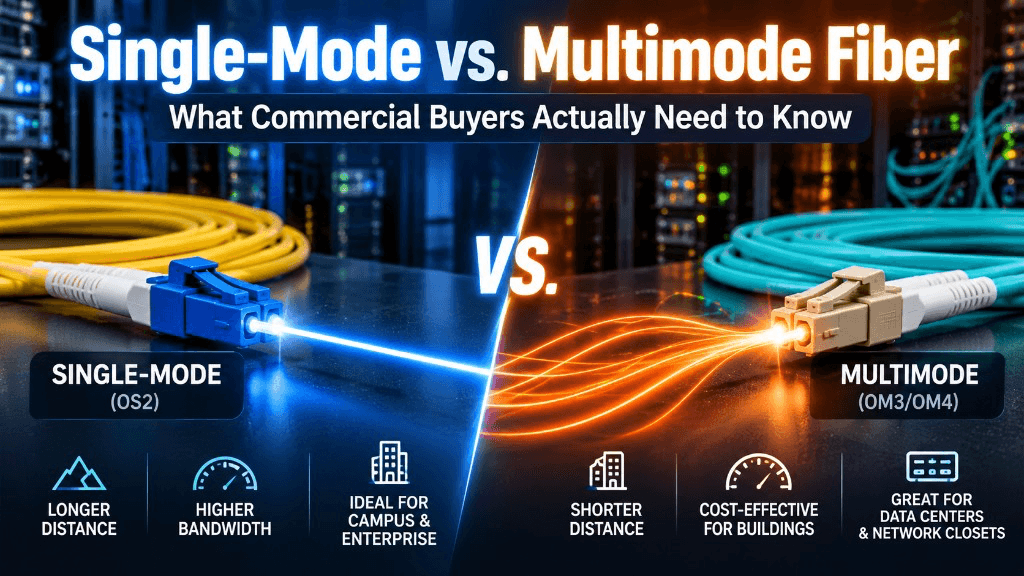
Fiber optic cabling decisions get framed as a tech debate. For commercial buyers, they are a distance, optics, and future-pathways decision that shows up in change orders if you pick wrong.
30 sec. overview
- Choose multimode when short in-building or campus links and lower-cost short-reach optics fit the design.
- Choose single-mode when you need longer distance headroom, campus or metro spans, or a backbone you do not want to outgrow quickly.
- Many modern commercial sites use both—but multimode in limited zones is less common than it used to be, while single-mode is increasingly the default for new backbones.
This guide is for Facilities, IT, and Ops buyers evaluating fiber optic cabling with a contractor—not for certifying engineers designing every loss budget from scratch. If you are still deciding copper vs. fiber for horizontals vs. backbones, start with our Cat6, Cat6A, or fiber decision guide.
Why This Choice Shows Up on Commercial Projects
You will see single-mode vs. multimode decisions when:
- Connecting MDF to IDF closets in a multi-story building during an MDF/IDF buildout
- Linking warehouse buildings on one parcel
- Extending backbone for cameras, access control, or Wi-Fi controllers
- Preparing for higher switch uplink speeds
- Replacing aging copper backbones that can no longer carry the distance or bandwidth plan
The wrong conversation is "which is newer." The right conversation is "what distance, what optics budget, what spare strand strategy, and what will we light in five years."
Southern California campuses—Inland Empire logistics sites with multiple buildings, Orange County office parks, and San Diego multi-building portfolios—feel this choice early because pathway windows are short and landlord rules can freeze conduit plans mid-design.
Plain-Language Differences That Matter
Multimode fiber (MMF)
Multimode uses a larger core and is typically paired with lower-cost short-reach optics for limited distances inside buildings or across short campus runs.
Buyer-relevant traits:
- Often attractive for shorter links when the entire channel (cable + optics + connectors) is designed together
- Distance limits depend on speed and fiber grade (OM3, OM4, and older OM types behave differently as speeds rise)
- Mixing legacy multimode grades carelessly creates headaches later
Single-mode fiber (SMF)
Single-mode uses a smaller core and supports much longer distances with the appropriate optics.
Buyer-relevant traits:
- Strong fit for longer campus ties and future-proof backbone thinking
- Optics can cost more depending on speed and reach class—still plan the full channel, not jacket color alone
- Increasingly common as the default for new commercial backbones even when today's run is "only" a few hundred meters
Jacket colors and connector colors help field techs, but do not buy by color alone. Specify fiber type, count, rating (indoor, indoor/outdoor, outdoor), and connectorization in the scope—the same discipline that prevents the structured cabling mistakes that turn into expensive service calls.
Distance Is Not the Only Question—But It Is the First Filter
Ask your contractor and IT team:
- What is the approximate pathway length including slack, not just "as the crow flies"?
- What speeds are required on day one (1G, 10G, 25G, 40G, 100G, etc.)?
- What speeds are reasonably likely at refresh?
- Who buys the optics—owner IT standards or contractor BOM?
- Are there intermediate panels, cassettes, or splices that add loss?
A link that "fits multimode today at 10G" may not be the link you want if the next switch generation pushes you into awkward optics choices. That is a planning discussion—pair it with network setup and configuration so uplink strategy and fiber type stay aligned.
Where Multimode Still Earns Its Place
Multimode can remain appropriate when:
- Runs are short and well inside the supported distance for your target speed and OM grade
- Your IT standard already standardizes on specific multimode optics and patching
- You are extending an existing multimode plant carefully—with testing and documentation—rather than creating a mixed mystery middle
Even then, document grade (OM3 vs. OM4, etc.), connector types, and test results at closeout. "Multimode" without grade is incomplete.
Where Single-Mode Is the Smarter Commercial Default
Lean single-mode when:
- Buildings on a campus sit farther apart than short-reach multimode comfortably supports at your target speed
- You want one backbone standard across a growing portfolio
- Metro-adjacent or long lateral pathways are in play
- Camera backhaul, access aggregation, or wireless controllers may concentrate traffic on those links later
- You are tired of re-cabling backbones every refresh cycle
For SoCal commercial campuses—think Inland Empire logistics sites with multiple buildings, or multi-building office parks in Orange County and San Diego—single-mode frequently simplifies the "what do we pull once" decision. Multi-site operators planning centralized visibility should also review single-site vs. multi-site security and centralized visibility.
Cost Mythology Buyers Should Avoid
Two incomplete stories show up in meetings:
- "Multimode is always cheaper." Cable might be, until optics, distance limits, and a near-term recable erase the savings.
- "Single-mode is always more expensive." Optics classes vary; the total project cost includes labor, pathway, testing, and how long the plant lasts.
Ask for a comparison that includes cable + termination + testing + optics assumptions—or clearly marks optics as owner-furnished. Incomplete BOMs create false winners. Use the same apples-to-apples approach described in how to compare low voltage contractor bids.
Do not expect a contractor to invent ROI percentages. Expect a clear scope and assumptions—fiber type, strand count, test method, and who owns optics—written into the bid before pathway closes.
Fiber and the Rest of Your Low-Voltage Stack
Fiber backbones often exist to serve:
- Network aggregation for user switches
- Uplinks that also carry cloud security cameras and NVR/cloud connector traffic patterns (design with IT—do not assume cameras "just work" over any link)
- Access control panels and controllers that hang off the IP network after access control installation
- Wireless controller or AP aggregation paths planned with your wireless access points design
Structured copper still dominates horizontal runs to desks, cameras, and doors in most commercial interiors. Fiber is usually the backbone and specialty lateral—coordinate both under one structured cabling standard so labeling and closeout stay coherent. Shared pathways for cameras, access, and alarms are covered in shared pathways for cameras, access, and alarms.
Installation Details Commercial Buyers Should Put in the Scope
Whether single-mode or multimode, insist the contract addresses:
- Strand count and spares — pulling minimum viable strands often costs almost as much labor as pulling a wiser count
- Indoor vs. outdoor ratings — including transitions and entrance facilities
- Pathway and bend-radius protection — especially in warehouses and older buildings
- Connector type and polarity method — LC duplex remains common; MPO appears in higher-density designs
- Splicing plan — fusion splice vs. connectorization expectations
- Testing — insertion loss at minimum; OTDR when specified for longer or critical links
- Labeling and as-builts — strand maps that Facilities can actually use
- Firestopping and AHJ requirements — where penetrations occur
End-Point Wireless is an Ontario, California low-voltage contractor supporting commercial fiber and copper pathways across Greater Los Angeles, Orange County, the Inland Empire, and San Diego. We align fiber choices with how the building will actually be operated—not with buzzwords. For a full scope of what belongs in a commercial low-voltage package, see what a commercial low voltage contractor actually handles.
Migration and Mixed-Plant Realities
Many sites inherit mixed fiber. Practical guidance:
- Do not assume you can freely mix multimode grades and get predictable high-speed results
- Media conversion is a tool, not a strategy—use it deliberately
- When refreshing, decide whether to overlay new single-mode while leaving legacy in place temporarily
- Test before you trust any "dark" strands someone claims are ready
- If documentation is missing, budget discovery. Guessing strand types from jacket rumors is how outages start.
When fiber is part of a broader security modernization wave, use the commercial security system upgrade checklist so cameras, access, and pathway work stay sequenced.
Buyer Questions to Bring to the Pre-Bid Meeting
Use these verbatim:
- For each link, what fiber type and grade do you recommend, and why?
- What distance and speed assumptions underpin that recommendation?
- Are optics in your bid or owner-furnished?
- What spare strand count are you proposing?
- What test method and pass/fail criteria will we receive at closeout?
- How will strands, panels, and patch cords be labeled?
- If we add another building in three years, does this backbone choice still make sense?
Clear answers beat brand-name fog.
Planning Checklist for Facilities and IT
Before you approve drawings, confirm:
- Pathway length includes slack and intermediate panels
- Day-one and refresh speeds are written down
- Fiber type and grade are specified per link, not vaguely
- Optics ownership (owner vs. contractor) is explicit
- Spare strand count and panel density are justified
- Test method and acceptance criteria are in the contract
- Labeling and as-built requirements match your closet standards
- Landlord or AHJ pathway rules are checked for outdoor and underground runs
This checklist keeps fiber from becoming a late change order when the ceiling is already closed.
What a Good Fiber Decision Looks Like Day-to-Day
When the backbone choice fits the facility, daily life is quieter: IT can plan switch refreshes without emergency optics hunts, Facilities can add a closet using the same strand map, and security projects that need camera or access aggregation do not reopen pathway fights. That operational calm is the payoff of clear fiber type, spare strands, testing, and closeout—not a product claim.
FAQ
Is single-mode always better for new construction?
Not always—but it is often the more future-tolerant backbone choice for commercial campuses. Validate against your distances, optics standards, and IT preferences.
Can I run single-mode and multimode in the same enclosure?
Yes, with clear separation, labeling, and patching discipline. Treat it as intentional design, not a junk drawer.
Do cameras need fiber to every camera?
Usually no. Most commercial cameras ride copper PoE horizontally, with fiber used for backbone or long laterals between closets or buildings. Design device by device with your security and network teams—coverage planning still starts with how many security cameras your business actually needs.
What OM grade should I buy if we stay multimode?
Match grade to your target speeds and IT standard—OM4 is a common modern short-reach choice, but the right answer is the one your optics and distance support. Do not mix grades casually.
How many strands should we pull?
Enough for day-one needs, spares for failure and growth, and practical panel density—without pretending anyone can predict every port in ten years. Your contractor should propose a count with rationale.
Is outdoor-rated cable enough for underground runs?
Follow pathway design: conduit, innerduct, burial method, and local requirements matter. Cable rating alone is not a complete underground design.
Who should own fiber testing acceptance—IT or Facilities?
Both have a stake. IT cares about optical budgets and optics; Facilities cares about pathways, labels, and longevity. Attend acceptance together when the backbone is critical.
Next Step: Facility Security Modernization Review
If you are planning a backbone refresh, a new IDF, or a multi-building link, get the single-mode vs. multimode decision into the scope before pathway closes.
Request a Facility Security Modernization Review to align fiber type, strand count, testing, and closeout with the commercial reality of your SoCal sites. Call 1-800-276-0415 or contact Endpoint Wireless to schedule a scoping conversation with the team. More guidance lives on the Endpoint Wireless blog.
Planning a fiber backbone?
Ask about a Facility Security Modernization Review, or get a quote for commercial fiber optic cabling across Southern California