What a Structured Cabling Contractor Should Hand You at Project Closeout
Share this article:
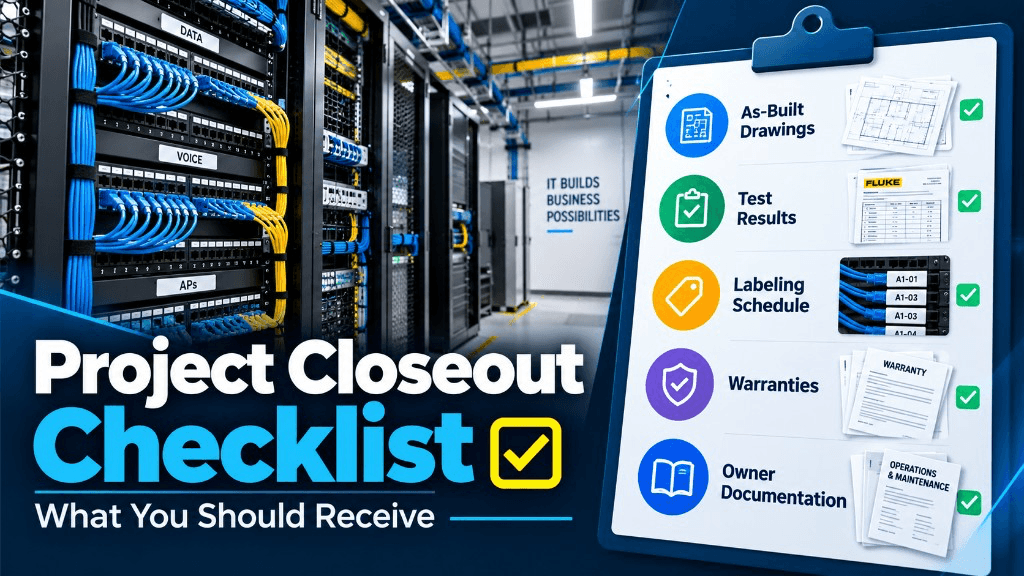
Structured cabling projects succeed or fail quietly after the last pull. Closeout is where a good install becomes a manageable asset—or where a "finished" job turns into months of mystery cables and missed punch items.
30 sec. overview
- A competent structured cabling contractor should leave you with documented pathways, labeled links, verifiable test results, and a clear owner handoff.
- "Everything is green" and a final invoice is not closeout—as-builts, labels, copper and fiber reports, warranties, and admin contacts are.
- Put deliverables in writing before work starts; confirm them at substantial completion before final payment.
This article is for facilities managers, IT leads, property managers, and general contractors who buy low-voltage work in Southern California and need closeout packages that survive staff turnover. For the mistakes that make closeout painful later, see five structured cabling mistakes that turn into expensive service calls.
Why Closeout Matters More Than the Last Day of Pulls
During construction, everyone watches the pulls and terminations. After move-in, the questions that cost time are different:
- Which port is this camera on?
- Where does this spare run terminate?
- Was Cat6A certified or only continuity-checked?
- Who owns the warranty claim if a link fails in year two?
- Can we add access control without opening every ceiling?
If those answers live only in a technician's memory, your next TI, camera upgrade, or Wi-Fi refresh will pay for rediscovery.
Closeout is the product. The cables are the materials.
Southern California sites—especially Inland Empire warehouses, Orange County tenant improvements, and multi-building campuses in Greater Los Angeles and San Diego—often close ceilings fast and change staff mid-lease. A complete closeout package is how the next Facilities or IT lead keeps working without a forensic hunt.
The Closeout Package Checklist (Buyer-Facing)
Ask for these deliverables in writing before work starts. Confirm them at substantial completion. Normalize assumptions the same way you would when you compare low voltage contractor bids.
1) As-built drawings that match reality
You need drawings that reflect what was installed—not the bid set that changed three times.
Useful as-builts typically include:
- Drop locations with room or grid references
- Pathway routes (conduit, cable tray, J-hooks) at a usable level of detail
- Telecom room / IDF / MDF layouts from your MDF/IDF buildout
- Rack elevations when rack work was in scope
- Notes for abandoned or capped pathways left for future use
PDF plus editable source (CAD or agreed format) is ideal when your GC or landlord requires it. At minimum, insist on clear PDFs your Facilities team can open without specialty software.
2) Labeling scheme you can read without a decoder ring
Labels should match a documented scheme:
- Faceplates and ports
- Patch panels
- Cables at both ends where practical
- Racks and cabinets
- Fiber enclosures and ports when fiber is in scope
A good scheme is boring on purpose: building, floor, closet, panel, port. If labels only make sense to the crew that installed them, redo the scheme before you accept the job.
3) Test results for copper and fiber
For copper horizontal cabling, expect permanent-link or channel test reports appropriate to the category specified (for example Cat6 or Cat6A) from calibrated testers—not a verbal "we pinged it." Media selection context lives in our Cat6, Cat6A, or fiber decision guide.
For fiber, expect length, loss, and polarity documentation aligned with the specified standard and connector types. If your project includes backbone or campus runs, clarify whether OTDR traces are required in the contract. Store reports by closet and date—they are your baseline when a link fails later.
4) Bill of materials and part numbers that matter later
You do not need every zip-tie SKU. You do need:
- Cable type and manufacturer (as installed)
- Jack / panel / cassette part numbers
- Key rack or enclosure models
- Any specialty components (media converters, splice trays, outdoor-rated cable)
This list shortens future matching buys and warranty conversations.
5) Photos of concealed work (when ceilings close fast)
In occupied TI and warehouse mezzanines, pathways disappear quickly. Reasonable photo documentation of tray fills, conduit entries, and behind-rack dressing helps the next crew—and helps you when someone claims "we never had spare."
6) Warranty and manufacturer enrollment paperwork
If the design called for a manufacturer channel warranty or system warranty, closeout should include enrollment confirmation or the exact steps still required from the owner. Do not assume "it is covered" without documents.
7) Admin and support handoff
Who do you call for punch, warranty, and MAC work? Get:
- Company contact path
- Project manager of record
- Any portal credentials created for the job (and how to reset them)
- Punch list status with open items dated
Copper Closeout Specifics Facilities Teams Forget to Demand
Structured cabling for offices, clinics, and light industrial spaces often mixes data, cameras, access control, and wireless APs on the same standards.
Confirm:
- PoE-aware design notes — where high-power devices (PTZ cameras, multi-radio APs, some door controllers) land, and whether cable length and category support the plan
- Spare density — spare ports and spare pathways called out, not implied
- Patch cord standards — who supplies day-one patching, and whether colors map to VLANs or device types by your IT policy
- Separation from electrical — notes where code and best practice clearances were maintained in shared rooms
If cameras and doors are part of a broader security refresh, align cabling closeout with the security system installation package so ports are named consistently with device IDs. End-Point Wireless often coordinates security installation and cabling so Facilities is not translating two different labeling languages—see also shared pathways for cameras, access, and alarms.
Fiber Closeout: Do Not Accept "Lit and Good"
When fiber is in the project—building backbone, warehouse links, or campus ties—closeout should answer:
- Single-mode vs. multimode installed (and where)
- Connector types (LC, SC, MPO, etc.)
- Strand counts and spare strands
- Splice vs. connector strategy
- Test method and pass criteria used
Pair this with your fiber optic cabling scope language so acceptance is objective. For type and grade decisions before install, use single-mode vs. multimode fiber for commercial buildings. Ambiguous fiber closeout is one of the fastest ways to stall a later Wi-Fi controller move or camera backhaul upgrade.
How Closeout Ties to Wi-Fi, Cameras, and Access Control
Cabling is rarely the end product. It enables:
- Wireless coverage planned with AP drops in the right places—see wireless access points for how drop quality affects RF outcomes
- Camera and door device density without daisy-chained surprises
- Cleaner change control when IT relocates users or adds IoT via network setup and configuration
For multi-building owners in the Inland Empire or coastal Orange County portfolios, consistent closet standards across sites matter as much as the category printed on the jacket. One site with perfect labels and one site with marker-pen ports will fight every portfolio IT standard you try to roll out—the same friction called out in single-site vs. multi-site security and centralized visibility.
What "Done" Should Look Like on Walkthrough
Use this field walkthrough script with your contractor:
- Spot-check labels against the as-built for a sample of rooms.
- Pick random ports and confirm they appear in test reports.
- Open IDFs: look for strain relief, bend radius, slack management, and firestopping where required.
- Verify spare capacity claims visually.
- Confirm rack power and grounding notes if those were in scope.
- Review punch list—no "we will get to it after final payment" orphans without dates.
If something fails the walkthrough, it is not a personality conflict. It is acceptance criteria.
Red Flags in Closeout Packages
Avoid these patterns:
- Test reports with the wrong building name or date range that does not match the install window
- As-builts that are clearly the bid drawings with no revision cloud history
- Labels that do not match panel port numbers in the documentation
- "Warranty included" with no manufacturer or contractor terms attached
- Missing fiber polarity or strand maps
- No owner training or handoff notes for how MAC work will be requested
Push back early. Fixing paperwork after ceilings are closed is still easier than forensic tracing during an outage.
Roles: GC, IT, Facilities, and the LV Contractor
Clarify ownership before substantial completion:
- GC / construction manager — schedule for inspections and ceiling close, coordination with other trades
- IT — VLAN intent, switch readiness, acceptance of test standards
- Facilities / property management — access, after-hours rules, long-term document storage
- Structured cabling contractor — installation quality, documentation, warranty path
End-Point Wireless, based in Ontario, California, works as the low-voltage partner for commercial sites across Greater Los Angeles, Orange County, the Inland Empire, and San Diego. We treat closeout as part of the deliverable—not an afterthought email. For what belongs in a commercial low-voltage scope overall, see what a commercial low voltage contractor actually handles.
How This Feeds Your Next Security or Network Project
A clean closeout package shortens:
- Camera and access control additions
- AP refreshes
- Tenant improvement re-stacks
- Multi-site standardization programs
If you are planning a security modernization on top of aging cable plant, bring the existing closeout docs to the first meeting—or note that they are missing so discovery is scoped honestly. Use the commercial security system upgrade checklist to sequence repair, replace, and recable decisions.
Planning Checklist Before You Sign Off
Use this short checklist before you approve final payment:
- As-builts match installed drops and pathways
- Labels match the documented scheme on panels and faceplates
- Copper and fiber test reports are stored by closet and date
- Spare ports and pathways are visible, not just promised
- Warranty and enrollment paperwork is complete or clearly owned
- Punch list open items have owners and dates
- Facilities and IT know where documents live after handoff
Teams that skip this checklist usually rediscover the plant during the first camera or AP project.
FAQ
Should every drop be certified, or is sampling enough?
Follow the specification and manufacturer warranty rules. Many commercial projects require 100% permanent-link testing for horizontal copper. Do not accept sampling unless the contract explicitly allows it and your IT/Facilities stakeholders agree.
What if the GC wants to close ceilings before tests are done?
That is a schedule risk. Tests and pathway photos should be sequenced so concealed work is verified. Put hold points in the project schedule.
How long should we keep cabling documentation?
Keep it for the life of the cabling plant and through major renovations. Store it where Facilities and IT can both find it—a shared drive with clear folder names beats a single email attachment.
Do we need fiber testing if the link "works"?
Yes if fiber was specified and paid for as a standards-based install. "Works today" is not the same as meeting loss budgets for future equipment.
Can End-Point Wireless document an existing plant we did not install?
Often yes, as a discovery / remediation scope. Expect labeling and testing time; forensic work is not free because the prior closeout was missing.
What is the difference between as-builts and shop drawings?
Shop drawings show the intended install method before or during work. As-builts reflect what was actually built. You need as-builts at closeout.
Who should attend the closeout meeting?
Someone from Facilities who will live with the closets, someone from IT who owns the edge, and the contractor PM. If property management holds landlord standards, include them for labeling and pathway rules.
Next Step: Facility Security Modernization Review
Before you sign off on your next cabling project—or if you inherited unlabeled closets—ask for a clear closeout standard in writing.
Request a Facility Security Modernization Review to define what "handed over" must include so your structured cabling supports cameras, access, Wi-Fi, and the next TI without starting from scratch. Call 1-800-276-0415 or contact Endpoint Wireless to schedule a scoping conversation with the team. More guidance lives on the Endpoint Wireless blog.
Need a clear closeout standard?
Ask about a Facility Security Modernization Review, or get a quote for commercial structured cabling across Southern California